Building Fitly·Brad Pineau·May 7, 2026·8 min read
Above and Below the Waterline: The Orchestrator Inside Fitly
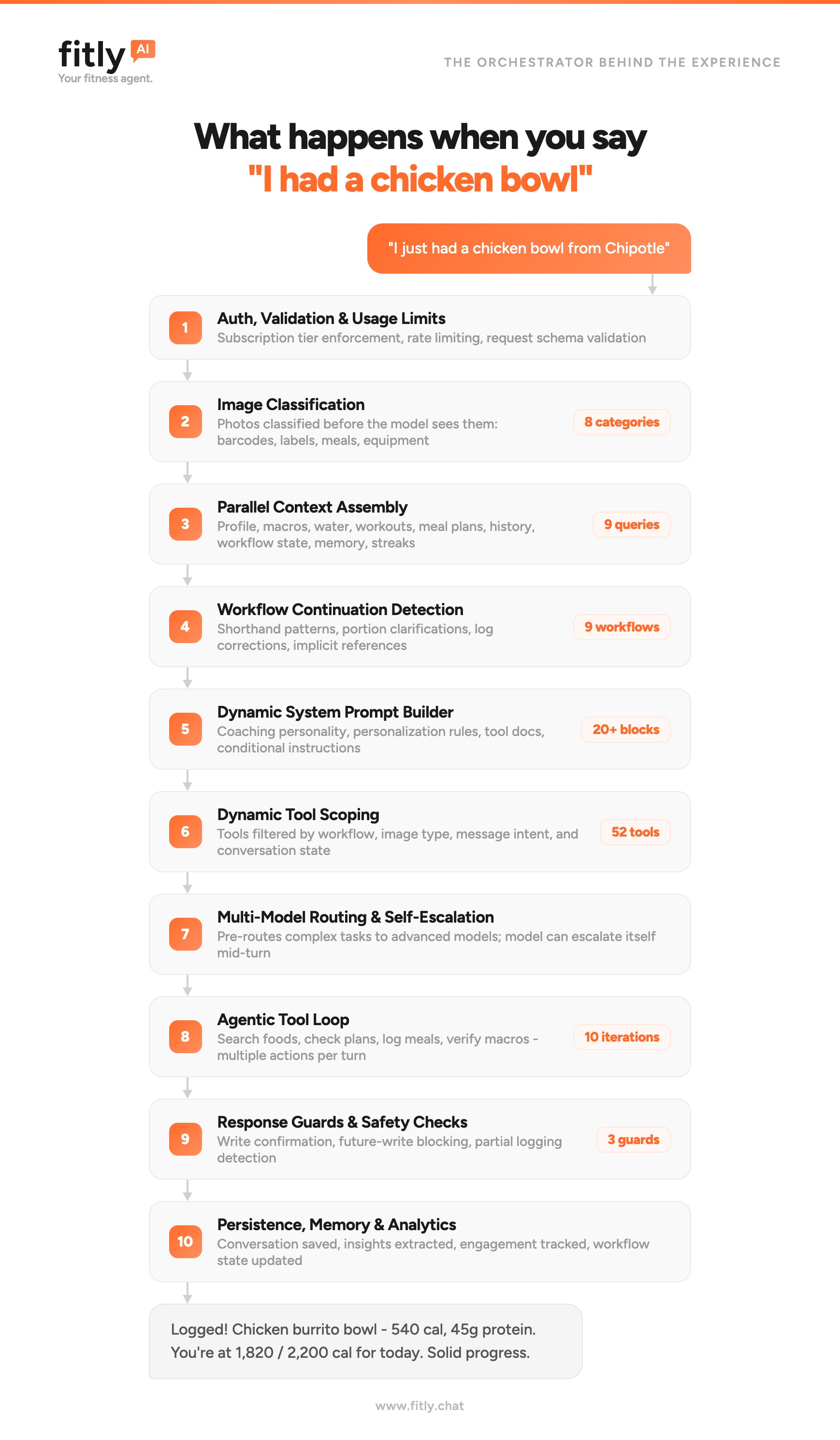
Most fitness AIs are a model with a prompt. Fitly is ten layers of orchestration running before the model ever speaks. Here is what is happening beneath the chat bubble.
The chat bubble is the easy part
You open Fitly. You type, "I just had a chicken bowl from Chipotle."
A second later, your meal is logged. Calories, protein, carbs, and fat are sitting on your dashboard. You are at 1,820 of 2,200 calories. The reply reads like a friend who has been paying attention all day.
That is what you see. It looks like one model answering one message.
It is not.
What sits behind that chat bubble is a ten-layer orchestrator. Nine systems run before the model is allowed to speak, and a tenth runs after. Most fitness AIs ship a model and a prompt and call it a coach. Fitly is the opposite: the prompt is the last thing we trust, and even then we do not trust it alone.
This is the part of the product that nobody sees. It is also the part that makes everything above the waterline possible.
Why orchestration, not "just call the model"
The naive version of an AI fitness app looks like this: take the user message, glue on some profile data, send it to a model, render the reply. It works for demos. It collapses the moment a real user shows up with a real life.
A real user says, "the bigger one." They do not specify portion sizes. They send a photo of a nutrition label and expect the app to know the difference between a label, a meal, and a barcode. They paste in last week's workout and ask, "make this harder." They scan a barcode mid-conversation and expect the running thread to continue, not reset. They burn through a free-tier limit and expect the app to stop them gracefully, not silently fail. They expect the system to remember that they have a shoulder injury, that they hate quinoa, and that they hit a PR last Tuesday.
Models do not do those things on their own. The model is a smart, expensive, somewhat unreliable text engine. Everything else, the parts that make it feel like a coach instead of a chatbot, has to be engineered around it.
That is what an orchestrator is. It is the system that decides what context the model gets, what tools it can use, what model it goes to, when it should escalate, and what guards run on the output. The model is one component of the orchestrator, not the other way around.
Here is what runs underneath every Fitly turn.
Layer 1 — Auth, validation, and usage limits
Before anything else, the request gets verified. Is the session valid? Is the user on a tier that allows AI chat? Have they hit their daily limit? Is the request schema well-formed?
This sounds boring. It is also where most production AI apps quietly leak money. Without this layer, a single misbehaving client can run a paying tier into the ground in an afternoon. Without it, free users get unlimited inference. Without it, a malformed payload reaches the model and produces an expensive, garbage response.
The layer that says no is part of what lets the layer that says yes feel generous.
Layer 2 — Image classification
If the message includes an image, the orchestrator routes it through a fast classifier before the chat model sees it. The classifier sorts images into eight categories: meal photos, nutrition labels, barcodes, equipment, scale readings, body shots, screenshots, and "other."
The reason: each category triggers a completely different downstream pipeline. A nutrition label gets OCR'd and parsed. A barcode gets looked up in the food database. A meal photo gets identified and portion-estimated. A scale reading gets logged as weight. Sending all of those to a single "look at this image and figure it out" prompt is slow, error-prone, and expensive. Classifying first lets the rest of the system be precise.
This is also a defensive layer. If a user uploads something the system cannot use, we tell them now, not after a 12-second roundtrip.
Layer 3 — Parallel context assembly
While the rest of the pipeline is preparing, the orchestrator fans out nine queries in parallel: profile, current macro targets, today's water and meal log, recent workouts, active meal and workout plans, conversation history, in-flight workflow state, long-term memory, and streak data.
These are independent. Running them in series would add nearly a second of latency for no reason. Running them in parallel is the difference between a reply that feels alive and one that feels like a slow web form.
The output of this layer is the user's full present-tense state, ready to be folded into the prompt. It is also the answer to a deceptively hard question, "what does the model need to know right now?" If you over-stuff context, you blow tokens and confuse the model. If you under-stuff it, you get generic coaching. Layer 3 is where that tradeoff gets made, and it is made the same way every turn.
Layer 4 — Workflow continuation detection
This is one of the layers I am proudest of, and one of the hardest to get right.
A workflow is a multi-turn task: building a meal plan, logging a meal that needs portion clarification, walking through onboarding, generating a workout program. Fitly tracks nine of them. The user does not know they are in a workflow. They just know they replied "yes, the bigger one" and expected the app to understand.
Layer 4 reads the incoming message and decides: is this a fresh request, or is the user still mid-workflow? Is "yes" a confirmation of the last thing? Is "make it 8oz" a portion clarification on the meal we were about to log? Is "no, the second one" a correction?
When this layer is wrong, the user has to repeat themselves and the system feels stupid. When it is right, the conversation just flows. The cost of getting it right is non-trivial: every workflow has its own continuation patterns, shorthand, and disambiguation rules.
Layer 5 — Dynamic system prompt builder
The system prompt is not a static blob. It is assembled per-turn from more than twenty blocks: the coach's personality, the user's chosen archetype, their diet type, current macro targets, today's progress, active workflow state, available tools, conditional instructions ("if the user is in fasting hours, do not suggest snacks"), tone calibration, refusal rules, and on and on.
Most of these blocks are conditional. A user who has not enabled photo logging does not need photo-logging instructions in their prompt. A user who is mid-workout does not need meal-planning preamble. A user on the free tier does not see Pro-tier tool documentation.
Why bother? Because every irrelevant token is a tax on quality and cost. A bloated prompt is a less reliable prompt. The dynamic builder is what lets us scale the surface area of the product without scaling the cost of every turn proportionally.
Layer 6 — Dynamic tool scoping
Fitly has fifty-two tools. Search the food database. Save a meal log. Update macro targets. Generate a workout. Pull a previous plan. Send a notification. The model does not see all fifty-two on every turn.
The orchestrator filters the tool list down to the ones that make sense given the workflow, the image type, the message intent, and the conversation state. A user logging a meal sees food and logging tools. A user mid-workout-plan sees plan-edit tools. A user asking a general question may see no tools at all.
This is not just a UX nicety. The bigger the tool list, the more the model second-guesses itself, the slower it responds, and the more often it picks the wrong tool. Tool scoping is one of the highest-leverage levers we have on response quality.
Layer 7 — Multi-model routing and self-escalation
Not every turn deserves the same model. A quick acknowledgment can run on a fast, cheap model. Generating a personalized eight-week training program cannot. Layer 7 makes that call before the turn starts, based on what the orchestrator already knows about the request.
The more interesting half of this layer is self-escalation. If the model gets partway through a turn and realizes the task is harder than expected, it can hand itself up to a more capable model mid-turn. The user never sees this. They just see a reply that did not stall out on a hard question.
The naive alternative is "always use the best model." That works until you read the bill. Multi-model routing is what makes it economically possible to run a thoughtful AI coach at consumer subscription prices.
Layer 8 — The agentic tool loop
This is the layer most people think of when they hear "agent."
After the system prompt is built and the tools are scoped, the model enters a loop. It can call tools, read the results, call more tools, and only respond to the user when it has what it needs. Up to ten iterations per turn.
A single "I had a chicken bowl from Chipotle" reply might involve: searching the food database, finding three candidate matches, picking the best one, looking up today's running totals, logging the meal, verifying macros against the daily target, and only then composing the user-facing reply. The user sees one bubble. The model ran six tool calls.
Without an agentic loop, you get hallucinated nutrition facts and made-up totals. With one, you get a coach that actually checks its work.
Layer 9 — Response guards and safety checks
Before the reply leaves the orchestrator, three guards run.
The write-confirmation guard makes sure that anything the user expected to be saved actually got saved. If the model claimed it logged a meal but the database write never happened, we catch that and either retry or surface a clear error. We do not let the model lie about what it did.
The future-write guard prevents the model from writing data into days that have not happened yet. It sounds obvious. It is, until you watch what happens at midnight in a user's timezone when the model gets confused.
The partial-logging guard catches the case where a user described three foods and only two got logged. The model can be enthusiastic. The guard is skeptical.
These three checks are the difference between an AI that occasionally lies and one that you can trust with your data.
Layer 10 — Persistence, memory, and analytics
After the reply ships, the work is not done. The conversation gets persisted. Long-term memory candidates are extracted ("user mentioned a shoulder issue"; "user prefers higher-protein dinners"). Engagement metrics get tracked. Workflow state advances. Streaks update.
This is the layer that makes the next conversation good. Without it, every turn starts from zero. With it, your agent gets sharper every week you use it.
What you actually feel
You will never see any of this. You will not know that nine queries ran in parallel, or that a classifier sorted your photo, or that a guard rejected a partial log and quietly retried. You will not know that the model was upgraded mid-turn, or that the tool list you got was twelve tools narrower than the user next to you.
You will feel that the app responds quickly. That it remembers what you told it last week. That it asks instead of guessing when it is not sure. That it does not log meals into next Tuesday. That it does not invent macros. That it sounds like a coach who has been paying attention.
That is the orchestrator. That is what we mean when we say Fitly is your fitness agent, not a chatbot bolted onto a tracker.
Why we built it this way
The boring honest answer: because the model is not enough.
A model is a powerful component. It is also a probabilistic, context-hungry, occasionally-wrong text engine. Treating it as the whole product is what produces apps that feel magical for thirty seconds and unreliable on day three. Treating it as one layer of an orchestrated system is what produces apps that hold up at scale.
Every fitness AI in the App Store has access to roughly the same models we do. The difference is what runs around the model. That is the moat. That is what we have spent our build cycles on. And that is why a sentence as ordinary as "I had a chicken bowl from Chipotle" can do as much real work as it does inside Fitly.
Want to try it? Get started with Fitly AI.